


Dear Sharpshooter,
Thanks for using our app and i am truly sorry for the inconvenience may have caused to you. This is Dorothy and i hope to be able to help you!
Yes, AnyTrans can help you back up photos and videos. If you back up them on computer directly, the back up speed will be fast. But the time to back up varies based on size of your data. If there are more files, it will take more time. It will be appreciated for your generous forgiveness and kind understanding.
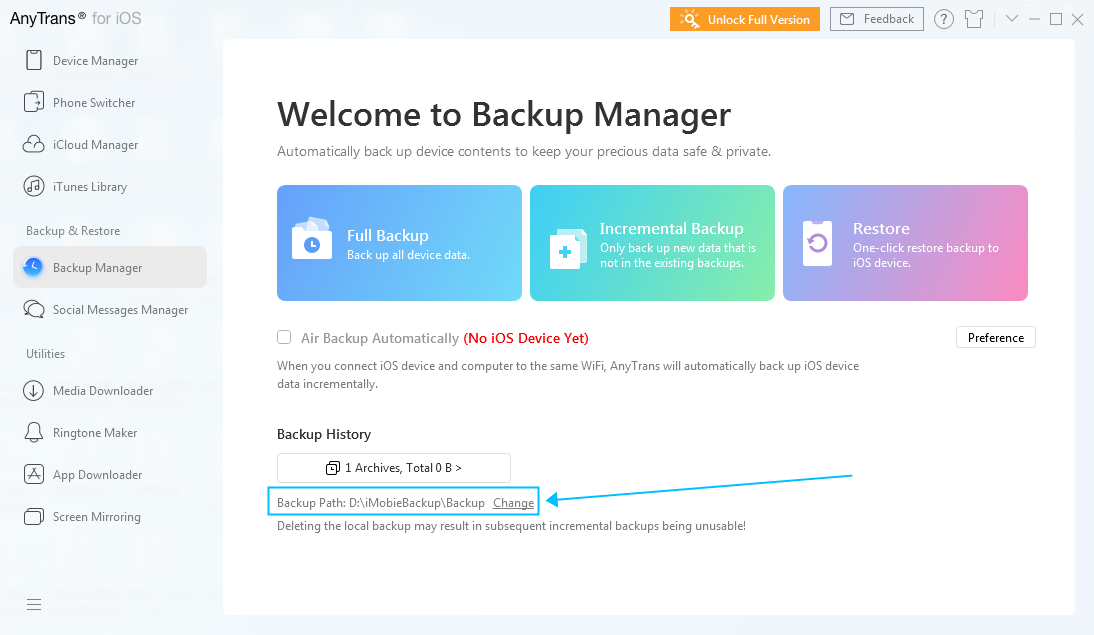
Meanwhile, AnyTrans also supports to back up to an external hard drive. But the back up speed is slower than on computer because of the USB Connection. It will be appreciated for your kind understanding. Please refer to instructions below to set the backup path at first:
1. Open AnyTrans > Click the Backup Manager icon on the interface.
2. Click the Settings button > Click “Select” option.
3. Select the path you want to save the backup > Click Open > Click Save.
Or if you just want to transfer all photos and vidoes to an external hard drive, please just change the export path. Then, you can export all your photos and videos.
Please kindly tell me whether it works for you or not.
Thanks for your kind feedback in advance.
Best regards,
Dorothy
Be the first to post a comment.