


Hello Srkent,
Thanks for using our app and i am truly sorry for the late reply. This is Dorothy and i hope to be able to help you!
To start with, would you please kindly give me a chance to explain this issue? Some users find that AnyTrans creates an album on the device when importing photos to device. And this album can’t be deleted on device directly. This is because Apple blocks the permission to delete the photos transferred by the third party software on device directly. If you want to delete the unwanted AnyTrans photo folder on your device, please follow the detailed steps below:
Open AnyTrans > Connect your device to computer > Click Device Manager feature > Click Photos > Click Albums > Right-Click the album “From AnyTrans” > Click Delete.
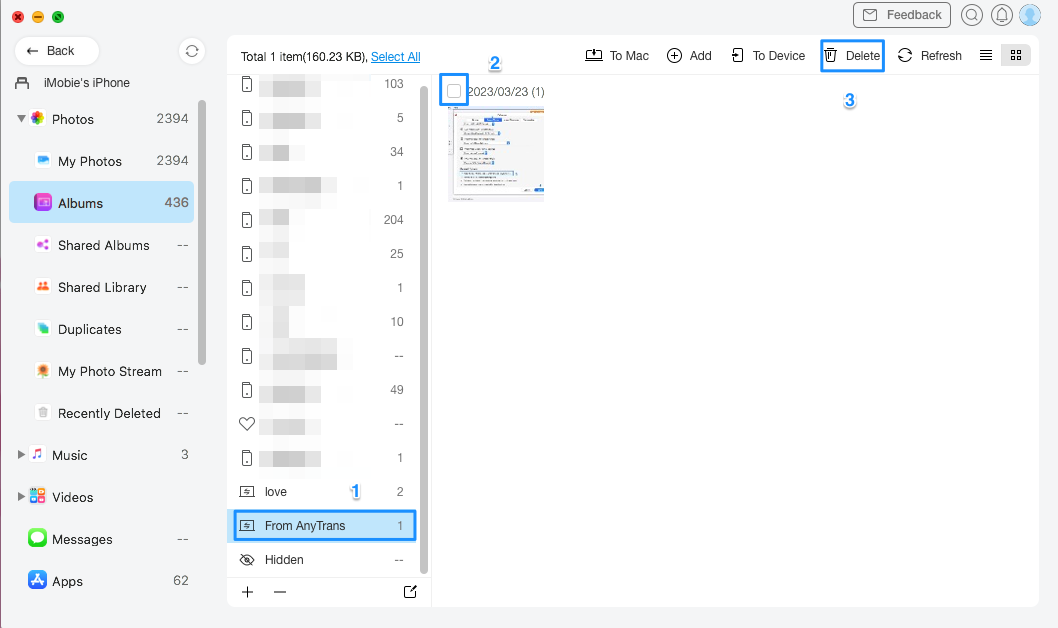
Please kindly tell me whether it works for you or not.
Thanks for your kind feedback in advance.
Best regards,
Dorothy
Be the first to post a comment.